Viking Voyager
- 4.6
- Rating
- 100.00K
- Installs
- Free
- Price

 Analysis by App-foxy
Viking Voyager is the kind of travel app that makes the most sense when I am already connected to a Viking journey. Developed by Viking Cruises, it is a free Travel & Local app for Viking Ocean, River and Expedition ships, designed to bring voyage information and onboard planning into one mobile space. That focus immediately sets it apart from a general travel planner: I would not install it to organize an independent city break, but I would expect it to become useful once my trip involves Viking’s shipboard schedule and services.
My first impression is that its value depends less on novelty than on timing. Before departure, it can serve as a reference point for getting familiar with the trip. Once onboard, it has a more practical job: helping me keep track of what is happening, decide how to spend the next part of the day, and avoid carrying every detail in my head. That is a worthwhile role, especially on a cruise where several activities, destinations and personal plans can overlap.
What the first week feels like
The first few days are when Viking Voyager has the strongest chance of earning a regular place on my phone. A shipboard holiday creates a particular kind of information overload. There may be a destination to explore, an activity to remember, a meal or appointment to plan, and a changing daily rhythm to follow. A dedicated app is more convenient than repeatedly searching through general travel tools because it is built around the voyage rather than around flights, hotels or independent reservations.
You May Also Like

 Blood Strike: 2.5 Anniversary
Blood Strike’s Loadouts Turn Every Drop Into a Tactical Gamble
A close look at Blood Strike’s custom loadouts: how fast access to signature weapons reshapes its battle royale rhythm, rewards preparation, and narrows the gap between fights.

 Pandora - Music & Podcasts
Pandora’s Music Is Easy to Start, but Harder to Recover
Pandora’s strength is its low-effort path from a seed to a station. Its weak spot is how much confidence it asks you to place in connection, setup, and quiet recovery.

 8 Ball Pool
8 Ball Pool Is Built on Rivalries, Rematches, and Routine
A close look at the rivalries, rematches, shared routines, and unanswered safety questions that turn a quick pool match into a persistent mobile community.

 Samsung Music
Samsung Music’s Quiet Strength Is Playing What You Already Own
Its reach comes less from spectacle than from dependable access to a personal library. That simplicity is both the app’s strongest retention engine and its ceiling.

 AccuWeather: Weather Radar
AccuWeather Review: A Quick, Clear Forecast for Everyday Decisions
For everyday plans, the best forecast is the one you can understand quickly. AccuWeather makes rain timing, radar, and local conditions easy to act on, with a few trade-offs.

 Hill Climb Racing
Why Hill Climb Racing Still Turns Crashes Into One More Run
A tiny car, a bumpy hill and one more upgrade: Hill Climb Racing keeps resurfacing because its simple chaos makes every near-miss feel personal.
More From Our News Desk



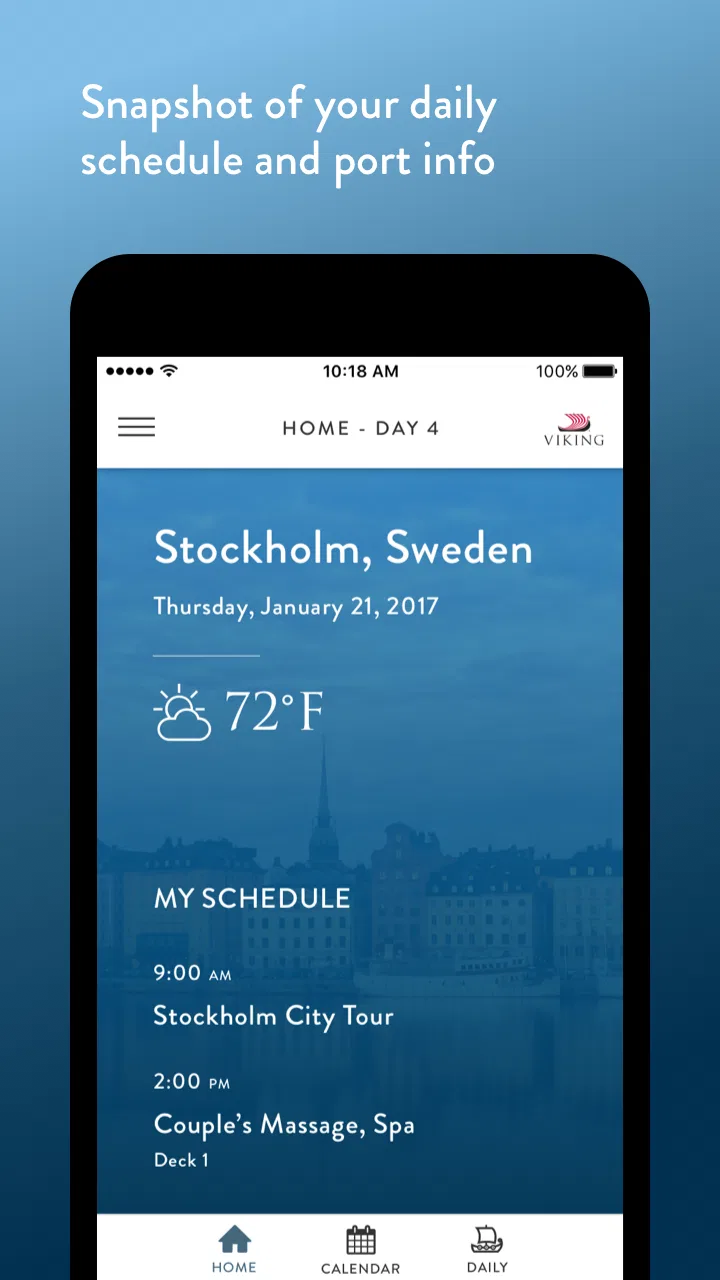
I would begin by opening it at the start of the day, checking the available schedule, and then returning whenever my plans changed. That simple habit matters. Instead of treating the app as a brochure, I would use it as a daily dashboard: look ahead in the morning, confirm details before leaving the ship, and check again later if I had free time. The app’s strongest early appeal is this concentration of trip-related information in a place that is easier to revisit than printed material.
It is also a better fit for travelers who prefer a calm, organized holiday. Someone who enjoys knowing what is available without planning every hour can use the app as a menu of possibilities. I can scan the day, choose one or two priorities, and leave room for wandering. That is more comfortable than trying to build a rigid itinerary in a separate planner, particularly when the ship itself is part of the experience.
A realistic example would be a morning in port. I might wake up unsure whether to join a planned activity, explore independently, or stay onboard for a quieter start. Rather than searching several places for information, I would check Viking Voyager first, compare the day’s options with the time I have available, and make a decision before heading out. Later, I could return to it to prepare for the next part of the day. The benefit is not dramatic automation; it is reducing small decisions and preventing avoidable confusion.
That said, I would not expect the app to replace every tool on my phone. General maps remain more useful for independent walking routes, local businesses and offline orientation. A weather app may be better for broader forecasts, and a notes app is still simpler for personal reminders. Viking Voyager earns its place by handling the Viking-specific layer of the trip. Its real strength is context, not being a universal travel replacement.
The app’s broad ship coverage is important here. It is intended for Ocean, River and Expedition experiences, so its relevance is not limited to one style of sailing. Even so, the exact usefulness I feel will depend on the trip I am taking. A traveler on a structured itinerary may open it frequently, while someone who prefers to ignore schedules and make every decision spontaneously may only consult it occasionally.
Who benefits most from the dedicated approach
I see the greatest value for travelers who want trip information close at hand but do not want to manage a complicated collection of documents. It should also suit companions who plan together: one person can check what is coming up while the other considers whether to join. For older travelers or anyone who dislikes switching between many services, a voyage-focused app can feel less demanding than assembling information from email, web pages and separate planning tools.
It is less compelling for someone who is not traveling with Viking. Since the app is tied to Viking Cruises, there is no reason to keep it as a general-purpose travel companion after the journey. Even during a Viking trip, a passenger who has already memorized the schedule and prefers paper information may not gain much from opening it repeatedly. The dedicated design is an advantage only when its specific context matches the user’s needs.
What remains useful after the novelty fades
The more important test is what happens after the first few days. Many travel apps feel exciting during setup and then become clutter that I stop checking. Viking Voyager has a better chance of lasting because its usefulness is connected to recurring moments: planning the day, confirming what is next, and making adjustments when my attention is elsewhere. Those are repeated needs during a voyage, not one-time tasks.
I would build a light routine rather than constantly monitor it. A morning check gives me an overview, while a second look before an activity or departure helps catch changes in my plans. This rhythm keeps the app useful without turning the holiday into an administrative exercise. In my experience, a travel companion works best when it supports decisions at natural points instead of demanding attention all day.
One less obvious advantage is that the app can help separate “must remember” information from “nice to know” information. On a busy trip, I might identify the few items that affect my timing and use the rest as optional inspiration. That prevents the schedule from becoming a source of pressure. I would rather use the app to protect free time than fill every empty space with another activity.
It can also help companions with different energy levels. One traveler may want to explore every destination, while another may prefer a slower day. Having the voyage information available makes it easier to discuss choices without one person becoming the sole keeper of the schedule. The app does not solve disagreements, but it can make the conversation more concrete: what is available, when it happens, and whether it fits the day.
For repeat travelers, the recurring value is more practical than emotional. I would not keep opening it because it is entertaining. I would return because it reduces friction around a specific kind of holiday. That distinction matters when deciding whether it deserves lasting space on a device. Once the voyage ends, its regular purpose naturally declines, so its long-term value is measured across the trip rather than across an entire year.
How it compares with ordinary travel tools
A calendar is useful for personal appointments, but it does not naturally present a cruise day as a connected experience. A notes app can store reminders, yet I would need to enter and maintain everything myself. General travel apps are often excellent for flights, hotels, maps and local discovery, but they are not designed around Viking’s onboard environment. Viking Voyager sits in the gap between those options: narrower than a travel super-app, but more relevant when the journey itself supplies the structure.
That specialization brings a trade-off. If I want one application to manage every part of a holiday, this will not be enough by itself. I would still use other tools for navigation, communication and independent research. But if my main question is “What matters for my Viking day, and where do I find it quickly?”, a dedicated app is less cumbersome than adapting a generic planner.
The app is free, which lowers the cost of trying it before deciding whether it fits my habits. It is rated for Everyone, and its Android listing shows a four-point-six average from around two-point-four thousand ratings, with more than one hundred thousand installs. Those figures suggest that it has found a real audience, although popularity alone would not determine whether it suits my travel style.
Maintenance: what I would need to keep in order
The maintenance burden appears manageable, but travel apps still need a little attention at the right time. I would install or update it before leaving, open it while I have a reliable connection, and make sure I understand where the important trip information is located. Doing that before boarding is more comfortable than trying to learn the app during a busy embarkation day.
I would also avoid assuming that installing it is the entire preparation process. A sensible workflow is to open the app before the trip, review the available voyage information, and then keep the phone charged during days when I expect to rely on it. A dedicated app cannot help if the phone is unavailable, so I would treat it as a convenience rather than my only record of essential arrangements.
For Android users, the listed minimum operating system is Android seven-point-zero, and the current version is v1.40.6. That makes checking device compatibility a sensible first step on an older phone. I would not wait until the day of travel to discover that an update or installation needs attention. This is a small preparation task, but it is exactly the kind of task that prevents a useful app from becoming frustrating.
Another maintenance question is whether I would keep it installed after the voyage. My answer would probably depend on how soon I expect to travel with Viking again. If another trip is approaching, keeping it available is convenient. If not, removing it is reasonable because its purpose is highly specific. That is not a weakness so much as an honest consequence of a focused travel tool: it earns storage through active relevance, not permanent everyday use.
I would still keep important personal details in a separate place when necessary. A screenshot, note or printed document can provide backup if I cannot access the app at a particular moment. This is especially sensible for information that affects transport, meeting points or other time-sensitive plans. The app can centralize the voyage experience, but good travel practice does not rely on one screen alone.
Where fatigue can set in
The biggest source of fatigue is the possibility of checking an app too often. A holiday can become less relaxing if every decision starts with a phone. I would avoid opening Viking Voyager simply because I have a spare minute. Instead, I would use it at deliberate checkpoints and then put the phone away. The app should reduce mental load, not create another stream of notifications or decisions in my routine.
Its narrow purpose can also feel limiting outside the shipboard context. If I am researching a local museum, comparing independent restaurants or finding a walking route, a general travel service will usually be more flexible. Viking Voyager is not where I would expect the deepest local discovery tools. I would use it for the Viking side of the day and switch tools when the question becomes broader.
Another possible friction point is relying on a digital schedule while traveling through unfamiliar places. Even a well-organized app does not remove the need to pay attention to time, location and personal energy. I would not treat an entry in the app as permission to rush from one plan to another. The best use is to understand my options, leave sensible margins, and confirm details before committing myself.
There is also a psychological trade-off between convenience and spontaneity. Having the full day visible can encourage me to optimize it instead of experiencing it. I would counter that by choosing only a few anchors and letting the app handle reference work in the background. The tool is most enjoyable when it gives me confidence to improvise, not when it persuades me to follow every available option.
Travel companions may also use the app differently. If one person checks it constantly and another never opens it, the first can accidentally become the group’s information desk. I would solve that by sharing the day’s key points verbally and agreeing on a simple plan. The app can support coordination, but it should not turn one traveler into a permanent administrator.
Does it earn lasting space?
My long-term verdict is positive, with a clear boundary. Viking Voyager earns space on my phone during a Viking Ocean, River or Expedition trip because it addresses a repeated, specific need: keeping the voyage understandable without scattering information across unrelated tools. I would recommend it to a Viking passenger who wants an easier way to orient each day, especially if they enjoy having options visible before making plans.
I would not recommend keeping it as a permanent travel essential for someone who is not using Viking Cruises. Nor would I present it as a replacement for maps, independent research, personal notes or backup documents. Its value is strongest when the trip is active and weakest when the trip is over. That makes it a purposeful companion rather than an app I would open casually throughout the year.
The free price makes the decision straightforward: install it before the voyage, give it a fair trial during the first days, and keep using it only if it genuinely simplifies your routine. My own approach would be to establish a morning-and-before-departure habit, use it to coordinate rather than over-plan, and keep a backup for details that matter most.
Ultimately, the app succeeds when it disappears into the background of a good holiday. I do not need it to entertain me or replace every other service. I need it to answer voyage-related questions quickly, help me make realistic choices, and reduce the chance that I miss something because the information was scattered. For that focused job, Viking Voyager is a sensible free addition and a useful part of the onboard experience, provided I remember that the best travel tool is one that supports the day without taking it over.
FAQs for Viking Voyager
01What is Viking Voyager, and what kind of game is it?
Viking Voyager is an adventure-focused game built around Viking-themed exploration, challenges, and progression. Players generally guide a Viking character through different environments, complete objectives, overcome hazards, and collect useful rewards. Before downloading, keep in mind that the overall experience may combine exploration with action, puzzles, or resource management, depending on the version available for your device. Its appeal mainly comes from the Norse setting and the sense of discovery.
02Is Viking Voyager free to download and play?
Viking Voyager may be available as a free download, but users should check the store listing carefully because free games can include optional in-app purchases, advertising, or paid items. These purchases might unlock bonuses, remove advertisements, or speed up progression. I recommend reviewing the payment information and parental-control settings before starting, particularly if children will use the device. Availability, pricing, and included features can also vary between Android and iOS.
03Does Viking Voyager require an internet connection?
The internet requirements for Viking Voyager can depend on the specific edition and the feature being used. Basic gameplay may work offline in some versions, while advertisements, cloud saves, updates, leaderboards, or account-related functions may require a connection. It is best to launch the game once while online and check whether its main levels remain accessible without Wi-Fi or mobile data. Players should also install updates regularly for compatibility and bug fixes.
04Is Viking Voyager suitable for children?
Viking Voyager may be appropriate for younger players if they enjoy fantasy adventures, but parents should review the official age rating before downloading. The rating can reflect cartoon violence, frightening themes, advertising, chat features, or in-app purchases. Gameplay difficulty and reading requirements are also worth considering. For children, enabling purchase restrictions and checking whether the game collects personal or usage data can help create a safer and more controlled experience.
05What devices are compatible with Viking Voyager, and how much storage is needed?
Compatibility depends on the current Android or iOS version supported by the developer, so users should compare the store requirements with their phone or tablet before installing. The download size shown in the store may not include additional files downloaded during setup, and future updates can require extra space. A stable device with available storage is recommended, especially if the game features detailed graphics, frequent content updates, or offline assets.
Pros
- Easy-to-learn controls make the game accessible to casual players.
- Viking-themed visuals create a distinctive and entertaining atmosphere.
- Short gameplay sessions are convenient for playing on the go.
- Progression offers a satisfying sense of improvement over time.
- Works well for players who enjoy exploration and light strategy.
Cons
- Some levels may feel repetitive after extended play.
- Difficulty can become uneven as challenges gradually increase.
- Limited variety may reduce long-term appeal for experienced players.
- In-game rewards may require considerable time to unlock.
- Performance and loading times can vary between devices.

Viking Voyager
Gallery